Showing posts with label sip. Show all posts

Saturday, November 27, 2010

Sip Servlets Application Routing Guidelines and Best Practices

Sip Servlets 1.1 enjoys great adoption in the telco industry displacing proprietary and legacy applications. One of the big promises of Sip Servlets 1.1 is the application (WAR module) composition and isolation provided by the Application Routing feature which is supposed to allow the applications to grow over time independently from each other and orchestrated in different services.

On the surface...

Application Routing is probably one of the most misunderstood parts of the specification. Misunderstood not in terms of function, but in terms of use and consequences. From JSR-289 application routing is described as a separation of concern concept similar to the Chain of Responsibility Design Pattern where each application is responsible for it's own small part of the service and can be added or removed on demand. In fact it would often look like a pipeline on your architecture diagrams:
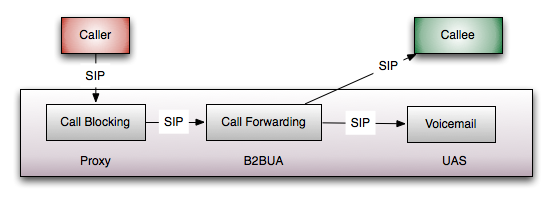
  • Call Blocking will check if the Callee has blocked the Caller and if so it will reject the call. Otherwise if the the Caller is not blocked it will just proxy the call to the next app.
  • Call Forwarding will forward the call to the Callee or her voicemail depending on availability status.
  • The Voicemail application (if reached) will act on behalf of the Callee and it will answer the call to record a message.
Looking great - clear responsibilities for each application, zero coupling, applications are completely unaware of each other, ..blah, blah, blah. Every architect's dream!

The Real World Picture

What is not shown in these diagrams however is how it works inside the container with all external entities. JSR-289 mandates that applications communicate with each other through SIP, which means all messages go up and down the stack to reach the next application. Internally, Mobicents and most Sip Servlets containers optimize the message passing by skipping a few stages of the SIP protocol stack, but still you have to do it. And that's not the problem at all. There are a number of things from the real world that are missing in the picture:
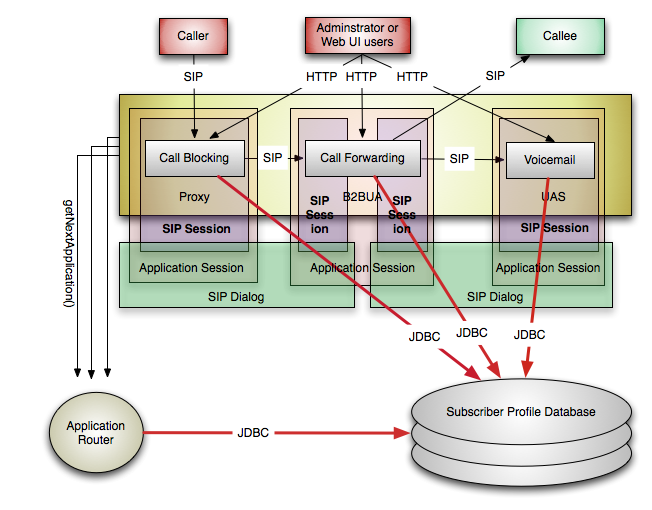
Each application creates it's own application session. The B2BUA application creates two Sip Sessions while the Proxy and the UAS application create one session each. Additionally if the container operates with dialogs it will create 2, 3 or 4 dialog representations. Sip Servlets applications have no awareness of the SIP dialogs and have no references to dialogs directly but they are in the memory. The Sip Servlets specification says that dialogs roughly correspond to SipSessions, which is true from application point of view, but in SIP terms the dialog spans from UAC to UAS through any proxies in the way, thus in the best case it is possible two or more sessions to share the same dialog instance if they are on the same machine.

So what's the big deal? The applications care only about their own state and not the other application's state, right? Not exactly. To maintain the call internally, the containers keep references to a number of objects that represent the transactions or the the application routing chain in some way. SipApplicationSessions have timers associated with them and so do the SIP client and server transactions. B2BUA and proxy implicitly have to keep the associated inbound and outbound requests/responses. There are also a number of properties that users can specify and are maintained in memory. That's just for empty sessions. Once the developers start adding session attributes independently for each app, it is almost certain that they will have duplicate data.

In real-world applications most of the data would be somewhere in persistent storage such as a database. The data would be queried and loaded in the sessions by the applications. Because the applications can't share state they will have to query the database independently and very likely transfer and use duplicate data like the user profiles and preferences. Note that I am not assuming that it has to be that way. You may be able to organize the data and the queries not to transfer redundant data, but this is very hard to do correctly over time and especially when you need to have separate Web UI to access the data. It is just better to make one network request than many.

On top of that if you took advantage of the application router properly it may also query the database, especially since it is responsible for assigning subscriber identity and function selection.

To summarize what we got so far for a single call in this 3-app service:
  • 4 times SipSession with attributes and properties
  • 3 times SipApplicationSession with attributes and properties
  • 2 times SIPDialog
  • Whatever transactions are in progress multiplied by at least 3 (client and server)
  • 3 times the timers
  • 3 times JDBC over the network, once for each app, each in separate DB transaction
  • 3 times call the getNextApplication() to the application router, each potentially querying the database again
  • ..and I am probably forgetting something
Fault tolerance

When you account for the fault-tolerance, you need to have at least one replica of the above state. Replication occurs all the time continuously and has very serious additional consequences for memory, network traffic and CPU utilization. Application Routing also amplifies any gaps in time where a failure is unrecoverable depending on the replication policy.
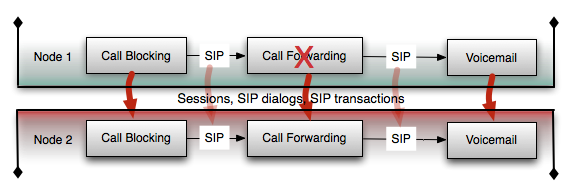
In the end, with or without fault tolerance, having this service implemented in 3 applications probably costs around 3 times more in terms of consumed hardware, development/testing and has much slower response time compared to a monolithic application that does the same with simple if .. then .. else statements. Application chaining doesn't look like such a good idea any more.

Converged HTTP applications spaghetti

Unlike SIP, HTTP servlet applications do not allow composition. Usually each SIP application would have some sort of Web UI in the same WAR module allowing users and administrators to configure the system or user profiles. Do you really want your service to have 3 different entry-points of configuration? Block users from one app, configure forwarding in another and set the voicemail greeting in a third app. One option would be to use a Java Portal (JSR-168 or JSR-286 with WSRP) portlets to combine the UI. That may or may not work. I am not going to cover the limitations of Java Portals, but the fact is that it has some limitations, greater complexity, performance penalty and so on. If you turn on and off application from the application router, your application router will have to update the portal configuration to reconfigure the UI.

In most cases you will have a separate Web UI application that is aware of the schema used by all 3 applications, which limits the potential of the SIP applications to grow independently from each other. A modification in one app may force a change in your Web UI app.

No matter which way you go, there will be a chain of dependencies that your applications or the application router should be aware of, which breaks the promise of isolation to some extent.

Application Composition is not a design pattern

You shouldn't design or plan your service to be in different applications. Sip Servlets application composition is not a chain of responsibility implementation. Applications are deployment units, not architectural building blocks. You don't design your Web Services specifically to be orchestrated with BPEL and certainly not with a particular BPEL implementation. Just like application routing, BPEL's power is in the integration.

Application composition is probably best fit for unrelated services from different vendors that consume different databases and in most cases run without being chained together with other applications. Application routing is OK as long as the actual application chaining is rare and applications are self-sufficient as individual services that have a single Web access point.

In that sense, application routing can also be used as a cheap rolling upgrade technique - just switch the requests to a new application and the new sessions will arrive in your new app while the old sessions will continue to go to the old app until they finish. AFAIK this will work on any container.

In conclusion, if you are an architect or developer you should forget that application routing exists. It is sysadmin job to reconfigure applications if they see fit or have no other choice.

Friday, April 16, 2010

The dreaded so-called "geographical failover" and SIP

This interesting requirement just keeps popping-up in the middleware world and is a topic of many threads in developer discussions as we are designing our HA architecture to be adequate and performant. The problem stems from a common deployment architecture where you have two or more data-centers in distant geographical locations (think WAN distance, where LAN is not possible) . Each data-center site has the same service deployed, but is responsible for serving only the requests from their geographical area. All data centers are independently fault-tolerant, but if one site goes down for any reason, this would cause service outage in the area it is supposed to cover.

Geographical failover usually refers to being able to temporary redirect the requests to other more distant data-center sites when a local total data-center failure occurs. Even if it is slower or more expensive, it is better than a completely unavailable service.

This problem is common for HTTP and SIP, and the strategies to solve it are very similar. The challenge is in two aspects:
  • Load balancing. Obviously, you need to make sure your local load balancers survive the data center failure. There are many ways this can done, but commonly you can just host the load balancers somewhere close to the users and keep it isolated from the data center. You should also make sure there is enough backup power and network infrastructure to keep them alive for a few hours or days.
    In Mobicents and JBCP, we introduced pluggable algorithms for the SIP/HTTP converged load balancer, and it is not hard at all to come up with a working solution. For instance, the load balancer algorithm may have two lists of server nodes - local nodes and distant nodes. If and only if all local application server nodes are dead, then the load balancer can start routing to the distant nodes. Plain and simple.
    If you are using a distributed load balancer (shown in the figure on right), one per site, it will behave the same way, and you may have several additional options depending on the IP load balancer capabilities.

    As long as the SIP load balancers are aware of the topology, the IP load balancer doesn't have to be aware of the other data-centers. It might be possible to instruct the IP load balancer to route requests to the backup data-center site, but the mechanism doesn't depend on it.
  • State Replication (a.k.a What happens with the ongoing calls after the failure?). In the case of complete data-center failure, the whole LAN cluster will go down. Let's first take a look at the case where Mobicents nodes only replicate state within the data-center network.
    The ongoing calls are likely to have some state associated with them and this state will be lost without replication. Unlike HTTP, in SIP the containers generally do not deliver requests to the applications if their dialog state doesn't exist in the protocol stack. SIP has strict rules about the state machines in the dialogs and transactions, thus the overall consistency depends on that state. All SIP requests sent after the failure would not succeed and the calls are technically lost. But, let's look at what exactly happens with lost calls in the following cases:
    • Simple media calls, audio or video calls - once the SDP exchange is complete the users can hear each-other and have a normal call without any SIP messages. So the failure in the SIP server will not affect them at all. As long as the Media Server is alive or the Media is flowing directly between the User Agents, the call will be fine. When the users hang-up, the BYE is lost, but it won't matter any more, because the call is over. Unless you need to capture the BYE and do some logic, you will be fine after the failure.
    • SIP-intensive applications - presence, chat, some IVR applications and so on. In these cases the application will fail due to the lost state.
Being aware of the limitations, lets see what are the options of for state replication between data-centers.

First, you have to realize that if you had enough network capacity to replicate the call state to distant nodes, you could just organize all nodes in small JBoss clusters where the nodes are from different geographical areas. JBoss already has a lot of settings in JBoss Cache/Infinispan and JGroups to fine-tune the connections, even if there is no dedicated feature for geography.

Thus, let's assume you don't have enough bandwidth for that. At this point it is very-application specific, because you must decide what part of the state you can lose. There are several options:
  • Partial replication per call between the geographical areas - lose some bits from each call
  • Rare replication - do the full replication, but only in steady-state calls when changes are unlikely to occur.
  • Priority calls - pick high priority calls and only replicate them.
  • No replication - invest in reducing the risk of complete data center failure. How hard is that? If the data-center is down, but your users are still online, this implies that there is massive working infrastructure somewhere. Moreover, power and network backup resources are available cheaply and they scale well. In fact, I can think of many reasons why the geographical replication methods mentioned above are not a good idea:
    • There may be a noticeable memory impact. In most implementations the local and the geographically replicated call state resides in different memory structures (so double the memory).
    • The performance impact may be huge - first because of the additional replication protocol logic in each node and second because your data centers must run at lower utilization to be ready to take the extra load in case of data-center failure.
    • Incidentally, the long distance network bandwidth is the most expensive. So you will have to pay for that as well.
    • Investing in hardware fault-tolerant resources for your data-center makes the reliability independent of the software. In other words - even cluster-unaware applications will benefit and will be more reliable.
    • Even if you recover some SIP state and your SIP applications don't fail, you still need to think how to keep the Media Servers alive or to switch them over to the other data-center.
    • Partial replication in general will still produce a lot of lost calls. It is just on best-effort basis.
    • Application are hard to code and test in partially replicated environment. It is an explosion of cases to be considered and tested when developing.
In summary, the geographically redundant load balancing is justified and easy to achieve at reasonable price. However state replication between data-centers is too expensive. It is much more efficient to focus on reducing the probablity of data-center failure, which is low anyways. Unless you have some service-specific condition that really fits the model, there is no point in state replication between data-centers.

Monday, October 26, 2009

Mobicents SIP Load Balancing

Check out our SIP Load Balancing (SIP LB) designs and deployment scenarios.

Our goal is to support as many scenarios as possible in a simple way and maintain flexibility for future enhancements and custom load balancing. We look at the load-balancer as a platform where you can implement your own routing decision logic - distributed or standalone, stateful or stateless, layer 3/4 or layer 7, it is all up to you.

The new load balancer provides quite a few improvements on top of the old one:
  • Performance (>1000 cps, but depending on the algorithm)
  • Flexibility - pluggable algorithms and customizable algorithms
  • Fault Tolerance - multiple smart SIP LBs can work together and nterchangeably in case of failure when sprayed by "dumb" IP load balancers
  • Cooperative Load Balancing - very often, mutliple protocols and sessions are involved in a telco service. Then you need to group calls, HTTP or other protocol sessions to stick together and be failed-over together. Only your application knows the right way to group these sessions, thus sometimes it is crucial to delegate load-balancing decisions to your application. Now, you could implement your own algorithms that take hints or instructions from the applications.
For more details you can look at these slides:


Feedback is welcome!

UPDATE: Revised November 1st, 2009

Wednesday, October 14, 2009

Introducing Mobicents IPBX

Many Mobicents community users are already familiar with IPBX, which is complete (and open-source) Media PBX with rich Web User Interface, but it's been on the background for some time due to higher priority tasks. Now with the increased community feedback, we present the new version of IPBX 1.0 CR, which is stable and covers a number of real use-cases. I cannot not mention the guys from Manaty for their help testing the IPBX and finding/solving a number of problems. But I want to thank all users who gave feedback and reported their experiences.

For those who are new to IPBX - this is a converged application (meaning it serves several protocols HTTP, SIP, Media/RTP) and as such it provides integrated experience acrosss several technologies. Let's see this short video of what the application really does:


What we see here is users authenticating against the application over HTTP and SIP protocols from Web browsers and SIP Phones respectively. They use the same credentials for both HTTP and SIP, the sessions are related to each other by the users and the state of the calls can be displayed in the Web browser of particular users. Moreover, when users call each-other they participate in the same calls, thus many users may want to see the state of the same call or conference bridge - the IPBX provides that as well.

Once you are in a call, you can invite more people in a conference, or you can remove participants. When you need to type something, use the conference chat. All participants in the conference will see the messages. The video also shows a function known as call parking, which allows you to transfer a call from one phone to another.

There are many things not shown in this video. When you are getting started you should take a look at the administrative panels (log in as admin/admin). Three important features there:
  • PSTN Accounts - allows you to call PSTN phones such as mobile and landline phones through a PSTN gateway service provider
  • PBX Settings - allows you to configure the PBX behaviour, the system announcement files, calling prefix, etc
  • User Administration - you can edit the user accounts from here
It is important to note that once configured, the PBX can operate without any Web User Interface. If you like you can register your phones blindly and start making calls by dialing peers or PSTN numbers (with the prefix). The SIP and Web parts of the application, although implemented by the same application logic can operate independently and still catch-up with each other if you want to log in from the Web UI.

On the technical side, this application was implemented on top of Mobicents Sip Servlets 1.0 for JBoss AS 4.2.3, Seam Telco Framework 2.2, JBoss Seam and Richfaces with JBoss Developer Studio and Mobicents Eclipse Plugins.

I really hope this project to gain more developer community interest to help us build the next features on the roadmap. Right now the following features are planned for the near future:
  • Recording calls
  • Better UI
  • Voicemail
  • Multiline calls
There are certainly a lot of other features we'd like to add, and if you have other ideas they are more than welcome.

There are few other videos, but I will just add this one for the Linux users with another set of phones:


Finally, some links:
Enjoy!

Friday, June 12, 2009

All Mobicents IDE Tools Online

Some news from the past few days - all Mobicents Eclipse Plug-ins are now updated and available from the new repository. Previously, only the Sip Servlets tools were maintained, but now the EclipSLEE, the JAIN SLEE Service Creation Tool is there as well.

What's new in this latest update?
  • EclipSLEE 1.2.5 updated to work with Eclipse 3.4 Ganymede and with JAIN SLEE 1.1 - Many thanks to wernerdit for the patches. EclipSLEE still needs to be updated to support the new deployment mechanism. For now you can only deploy to localhost.
  • Sip Servlets Core Plugin 1.0.3 updated to fix a deployment issue and some glitches with Windows when loading the management console. It works with both JBoss Application Server 4.2.x and 5.1.x distros.
  • Sip Phone Plugin 1.0.1 updated to fix some Windows issues. There is still a flicker in the graphs in Windows, but it's reduced now. Will work on that later.
Well, with this set of tools you can create and test both Sip Servlets and JAIN SLEE applications. Note that all 3 plugins do not depend on each other and you can install them separately, but they look best together :)


This is our update site: http://mobicents.googlecode.com/svn/downloads/sip-servlets-eclipse-update-site/
(i admit, putting the update site in "sip-servlets-..." was a shortsighted idea, because we have JAIN SLEE tools there as well, but it's just a path name, it doesn't matter)

You can see the documentation about the Sip Servlets plugins here.
While the EclipSLEE documentation will remain at the old location for now.

I hope you enjoy it.

Sunday, May 31, 2009

Time for Seam Telco Framework 2.1

The Mobicents application framework for SIP and Media on top of Seam is now officially named Seam Telco Framework (STF) and it just reached version 2.1!

There have been a number of changes and fixes since the last public version and the current 2.1 version must be stable enough to be consumed by all users.

The goal is still the same - to unify the programming model for Telco and JEE application. A somewhat new perspective for the framework is to minimize the new APIs and reuse as many standard or established APIs as possible (JSR-289, MSC or JSR-309) in order to keep a flat learning curve. You can think of it as something using the Seam infrastructure to expose these APIs to your application. For example the SIP messages and the media notification are delivered through Seam events in the context of a JSR-289 Sip Servlets Session. The Sip Servlets Session itself is backing the Seam SESSION scope context similarly to how the HTTP sessions work in Seam. Additionally, most of the framework objects are available and exposed through the Seam IoC and scoped at the right level. The STF simply plugs into Seam and reuses whatever makes sense in the SIP world. By the same logic, Seam uses that same infrastructure to expose the other APIs from the diagram (JEE, JBoss Frameworks and others) in certain roles - JSF for presentation, jBPM for flow and navigation, Drools for security and so forth.

We also want to highlight the point that most major IDEs already have support for Seam core syntax. You can use the same IDE tools to code SIP components without any extra plugins. Again, everything from STF is exposed through the Seam core infrastructure as events, components or scopes.

You should note the following changes:
  • The new documentation is here.
  • This source code of the latest stable release 2.1 is here (where the examples are stable).
  • The source code trunk has moved to here (including the dev examples).
  • The media framework is bundled.
  • The Connection and Link IVR helper classes are unified under a single IVRHelper class now. You can check the examples and the documentation for more information.
To have quick glance let's dive into the familiar conference IVR example:
@Scope(ScopeType.STATELESS)
public class MediaFrameworkDemo {
@Logger Log log;
@In MediaController mediaController;
@In SipSession sipSession;
@In MediaSessionStore mediaSessionStore;
@In IVRHelper ivrHelper;
@In MediaEventDispatcher mediaEventDispatcher;

@In(scope=ScopeType.APPLICATION, required=false)
@Out(scope=ScopeType.APPLICATION, required=false)

String conferenceEndpointName;

private final String announcement =
"http://mobicents.googlecode.com/svn/branches/servers/media/1.x.y/examples/mms-demo/web/src/main/webapp/audio/welcome.wav";

@Observer("INVITE")
public void doInvite(SipServletRequest request) throws Exception {
// Extract SDP from the SIp message
String sdp = new String((byte[]) request.getContent());

// Tell the other side to ring (status 180)
request.createResponse(SipServletResponse.SC_RINGING).send();

// Store the INVITE request in the sip session
sipSession.setAttribute("inviteRequest", request);

// If this is the first INVITE in the app, then we must start a new conference
if (conferenceEndpointName == null)
conferenceEndpointName = "media/trunk/Conference/$";

// Create a connection between the UA and the conference endpoint
mediaController.createConnection(conferenceEndpointName).modify("$",
sdp); // also updates the SDP in Media Server to match capabilities of UA
}

@Observer("connectionOpen")
public void doConnectionOpen(MsConnectionEvent event) throws IOException {
// Save this connection where the framework can read it
// mediaSessionStore.setMsConnection(event.getConnection());// This is done automatically in STF 2.0

// The conference endpoint is now assiged after we are connected, so save it too
conferenceEndpointName = event.getConnection().getEndpoint()
.getLocalName();

// Recall the INVITE request that we saved in doInvite
SipServletRequest request = (SipServletRequest) sipSession
.getAttribute("inviteRequest");

// Make OK (status 200) to tell the other side that the call is established
SipServletResponse response = request.createResponse(SipServletResponse.SC_OK);

// Put the SDP inside the OK message to tell what codecs and so on we agree with
response.setContent(event.getConnection().getLocalDescriptor(),
"application/sdp");

// Now actually send the message
response.send();

// And start listening for DTMF signals
ivrHelper.detectDtmf();
}

@Observer("DTMF")
public void dtmf(String button) {
// If the other side presses the button "0" stop the playback
if("0".equals(button)) {
ivrHelper.endAll();
} else {
// otherwise play announcement
ivrHelper.playAnnouncementWithDtmf(announcement);
}
// Also log the DTMF buttons pressed so far in this session
log.info("Current DTMF Stack for the SIP Session: "
+ mediaEventDispatcher.getDtmfArchive(sipSession));
}

@Observer( { "BYE" })
public void doBye(SipServletRequest request) throws Exception {
request.createResponse(200).send();

// And clean up the connections (not really required, because there is automatic cleanup in STF 2.1)
MsConnection connection = mediaSessionStore.getMsConnection();
connection.release();
}

@Observer("REGISTER")
public void doRegister(SipServletRequest request) throws Exception {
request.createResponse(200).send();
}

}
This is how you can do conferencing and IVR just by subscribing a few methods to a few events without implementing any callback interfaces or keeping track of how the media and SIP events are related. You will notice some differences and comments. There is significant effort by STF to automatically assign and cleanup media objects when it's clear what is expected or when they should not be used any more (for example they are cleaned up when the SIP session is destroyed). Overall we just try to keep the glue code out of your application or at worst keep the glue in the metadata.

What happened with version 2.0?

Version 2.0 is was released without announcment only to solve particular problems without being fully tested. The 2.1 version has some fixes on top of 2.0 and the API changes are explained in the documentation. If you are 2.0 user all APIs are back-compatible and you should be able to switch to 2.1 without any effort.

As usual, any suggestions and feedback are welcome!

Tuesday, February 3, 2009

Rich Telco Applications with Seam

UPDATE: The post was edited for clarity.

The Mobicents Seam-based Sip Servlets framework was extended with Media functions and now goes beyond SIP to unify the component models for Telco and Web applications. With this move, we are addressing the need to build quickly Media-intensive applications like PBX, conferencing, Interactive Voice Response (IVR), transaction confirmation and others.

With the help of the Seam development tools these applications can be written and tested in no time, so even if you don't want to use the Seam model in your production applications, you will find it useful for smaller "disposable" applications, or for rapid prototyping and proof-of-concept applications.

Need a conferencing application?

@Name("conference")
@Scope(ScopeType.STATELESS)
public class Conference {
@Logger Log log;
@In MediaController mediaController;
@In SipSession sipSession;

@In(scope=ScopeType.APPLICATION, required=false)
@Out(scope=ScopeType.APPLICATION, required=false)
String conferenceEndpointName;

@Observer("INVITE")
public void doInvite(SipServletRequest request) throws Exception {
String sdp = new String((byte[]) request.getContent());
request.createResponse(180).send();
sipSession.setAttribute("inviteRequest", request);
if (conferenceEndpointName == null)
conferenceEndpointName = "media/trunk/Conference/$";
mediaController.createConnection(conferenceEndpointName).modify("$",
sdp);
}

@Observer("connectionOpen")
public void doConnectionOpen(MsConnectionEvent event) throws IOException {
conferenceEndpointName = event.getConnection().getEndpoint()
.getLocalName();
SipServletRequest request = (SipServletRequest) sipSession
.getAttribute("inviteRequest");
SipServletResponse response = request.createResponse(200);
response.setContent(event.getConnection().getLocalDescriptor(),
"application/sdp");
response.send();
}

@Observer( { "BYE", "REGISTER" })
public void sayOK(SipServletRequest request) throws Exception {
request.createResponse(200).send();
}

}

That's all. No cheating.

What is happening here is that when an INVITE comes (i.e. when you dial the server), we connect the call to a conference endpoint in Mobicents Media Server. If this is the first call, the conference endpoint is not assigned yet (null) and we allocate a new endpoint (with .../Conference/$) for the application. Once the connection is established, the connectionOpen event occurs, then we store the conference endpoint name at the application scope and when the subsequent calls in this application see it they will connect to the same endpoint. We can easily extend this application to work with multiple conferences or add other media functionality. All SIP and Media events occur in a SIP Session, which is basically one call from one user (or one phone). If you want to share data in the SIP session scope simply inject the SipSession as shown in the application or create a SESSION-scoped Seam component. This conference example is available here. If you want to understand Mobicents Media Server and the MSC API you should read the Mobicents Media Server Guide.

In addition to the basic media support we are aiming to simplify the most common use-cases for media applications. While developing media applications I noticed that one SIP call is always constructed like this:

or the more simple chain:

In both chains the call is terminated at some media endpoint - IVR or Conference or an Announcement endpoint (which is not shown in the diagrams). After the call is established, the user agent is connected to exactly one media endpoint at any time, either directly or through a Packet Relay endpoint. This means that we can safely store all these links and endpoints related to the call right into the SIP session and never worry again about how to pass them to another method or component. If you need to switch to another chain just keep the session data updated. That's why we are looking into reserving a special place in the SIP session for the media objects.

To understand it better let's look at another example:
@Name("mediaFrameworkDemo")
@Scope(ScopeType.STATELESS)
public class MediaFrameworkDemo {
@Logger Log log;
@In MediaController mediaController;
@In SipSession sipSession;
@In MediaSessionStore mediaSessionStore;
@In ConnectionIVRHelper connectionIVRHelper;
@In MediaEventDispatcher mediaEventDispatcher;

@In(scope=ScopeType.APPLICATION, required=false)
@Out(scope=ScopeType.APPLICATION, required=false)

String conferenceEndpointName;

private final String announcement =
"http://mobicents.googlecode.com/svn/branches/servers/media/1.x.y/examples/" +
"mms-demo/web/src/main/webapp/audio/welcome.wav";

@Observer("INVITE")
public void doInvite(SipServletRequest request) throws Exception {
// Extract SDP from the SIp message
String sdp = new String((byte[]) request.getContent());

// Tell the other side to ring (status 180)
request.createResponse(SipServletResponse.SC_RINGING).send();

// Store the INVITE request in the sip session
sipSession.setAttribute("inviteRequest", request);

// If this is the first INVITE in the app, then we must start a new conference
if (conferenceEndpointName == null)
conferenceEndpointName = "media/trunk/Conference/$";

// Create a connection between the UA and the conference endpoint
mediaController.createConnection(conferenceEndpointName).modify("$",
sdp); // also updates the SDP in Media Server to match capabilities of UA
}

@Observer("connectionOpen")
public void doConnectionOpen(MsConnectionEvent event) throws IOException {
// Save this connection where the framework can read it
mediaSessionStore.setMsConnection(event.getConnection());

// The conference endpoint is now assiged after we are connected, so save it too
conferenceEndpointName = event.getConnection().getEndpoint()
.getLocalName();

// Recall the INVITE request that we saved in doInvite
SipServletRequest request = (SipServletRequest) sipSession
.getAttribute("inviteRequest");

// Make OK (status 200) to tell the other side that the call is established
SipServletResponse response = request.createResponse(SipServletResponse.SC_OK);

// Put the SDP inside the OK message to tell what codecs and so on we agree with
response.setContent(event.getConnection().getLocalDescriptor(),
"application/sdp");

// Now actually send the message
response.send();

// And start listening for DTMF signals
connectionIVRHelper.detectDtmf();
}

@Observer("DTMF")
public void dtmf(String button) {
// If the other side presses the button "0" stop the playback
if("0".equals(button)) {
connectionIVRHelper.endAll();
} else {
// otherwise play announcement
connectionIVRHelper.playAnnouncementWithDtmf(announcement);
}
// Also log the DTMF buttons pressed so far in this session
log.info("Current DTMF Stack for the SIP Session: "
+ mediaEventDispatcher.getDtmfArchive(sipSession));
}

// Just say OK to these messages.
@Observer( { "BYE", "REGISTER" })
public void sayOK(SipServletRequest request) throws Exception {
request.createResponse(200).send();

// And clean up the connections
MsConnection connection = mediaSessionStore.getMsConnection();
connection.release();
}

}

This is almost the same conference application with some IVR capabilities and some comments between the lines. The MediaSessionStore stores the call-related media objects (the MsConnection in this case) and ConnectionIVRHelper will read it from there when it is doing DTMF detection or playing announcement.

Once you are connected to the conference the application works like this - when you press a button 1-9 it will play a personal announcement (only the user who pressed the button can hear it). If the users presses "0" the announcement will be stopped. Note that MediaSessionStore, MediaEventDispatcher and ConnectionIVRHelper are not part of the framework right now, but you can copy and paste them into your own application from the media framework demo application in SVN (the discussed example). Eventually the classes from the org.mobicents.servlet.sip.seam.session.framework package will be moved into the main framework jar.

Development


If you've read the previous post about the Seam framework, you would already know that these applications can use almost all Seam features including hot-deployment and JBoss Tools-assisted development. Note that you don't need JBoss Tools, you can use your own IDE or no IDE with Ant or Maven or whatever you want.

Here is what you need to get started with JBoss Tools:
  • Mobicents Sip Servlets 0.7.2 with JBoss AS 4.2.3 or Mobicents Sip Servlets 0.8 with JBoss AS 4.2.3 (please do not use it with JBoss AS 5.0 for now, since the Media support there is still in technology preview stage)
  • Install the latest nightly build of JBoss Tools in Eclipse 3.4 (this is the update site) - you need JBoss Seam, JBoss AS Tools and Richfaces plug-ins as minimum. You must use the nightly builds for Seam 2.1 support. Soon, a new JBoss Developer Studio will be released with official Seam 2.1 support.
  • Get Seam 2.1.1.GA and configure it as Seam runtime in JBoss Tools when asked.
Once you create a Seam 2.1 project you can extend it with the Telco framework by following these steps:
<?xml version="1.0" encoding="UTF-8"?>

<sip-app>

<app-name>PUT_SOME_APPLICATION_NAME_HERE</app-name>
<display-name>SeamEntryPointApplication</display-name>
<description>SeamEntryPointApplication</description>

<main-servlet>
SeamEntryPointServlet
</main-servlet>

<servlet>
<servlet-name>SeamEntryPointServlet</servlet-name>
<display-name>SeamEntryPointServlet</display-name>
<description>Seam Entry Point Servlet</description>
<servlet-class>
org.mobicents.servlet.sip.seam.entrypoint.SeamEntryPointServlet
</servlet-class>
<load-on-startup>1</load-on-startup>
</servlet>

<listener>
<listener-class>
org.mobicents.servlet.sip.seam.entrypoint.SeamEntryPointServlet
</listener-class>
</listener>

</sip-app>
  • Now you are done. Just start adding Seam components.
Another way to get started is to checkout one of the examples mentioned above and play with them without IDE support (but it requires Maven).


Some guidelines
  • Do not subscribe methods to SIP and media events in Seam components with SESSION or CONVERSATION scopes! The reason is that each of these SESSION or CONVERSATION scoped components is likely to have multiple instances (depending on the number of the sessions) and they all will be called, which is probably not what you want.
  • Always subscribe public methods to SIP and media events. Any other access modifier will cause you method not to be called.
  • When dealing with JPA, always use your own EntityManager. Either EVENT or METHOD scoped or manage it manually through the EntityManagerFactory. The default CONVERSATION-scoped entityManager might produce "EntityManager closed" errors.
  • When initiating a SIP request from a Web session, do it in another thread! Seam uses thread-local storage and the Web contexts will collide with the SIP contexts. We are working on solving this issue and will probably be addressed in the future.
  • Keep in mind that outjection occurs at the end of a method call. If you attempt to use an outjected variable from a nested method call, it will fail.
Any feedback or contributions are welcome!